
FEATURES
Gym Display: your timer on a TV
The time left, the set and what’s next, big enough for a whole room, on any AirPlay TV or connected display
In a class or a home gym, a phone screen is too small to follow from across the room. Gym Display puts Cero’s timer on a TV or a big screen: the interval, the time left, the set and what’s next.
How to set it up
- Start a timer in Cero and open Gym Display.
- Open Control Center, tap Screen Mirroring and choose an AirPlay TV or display. A display connected by cable works too.
- Return to Cero: the TV shows the timer, and your phone keeps the controls.
- Tap Stop TV Display to end the TV view.
What it shows
- The current interval and its time left, in big type.
- The set, such as Set 2 of 8, or the interval, such as Interval 3 of 12.
- The time remaining for the whole workout.
- What’s next, such as Low intensity 00:15.
Audio Output sends only the sound to a speaker or a TV, without the picture, so you can hear Cero’s cues and your music on the gym’s speakers.
YOUR NEXT SESSION STARTS HERE
Bring the effort.
We’ll keep the time.
Cero is free to download for iPhone, iPad and Apple Watch.
Download Cero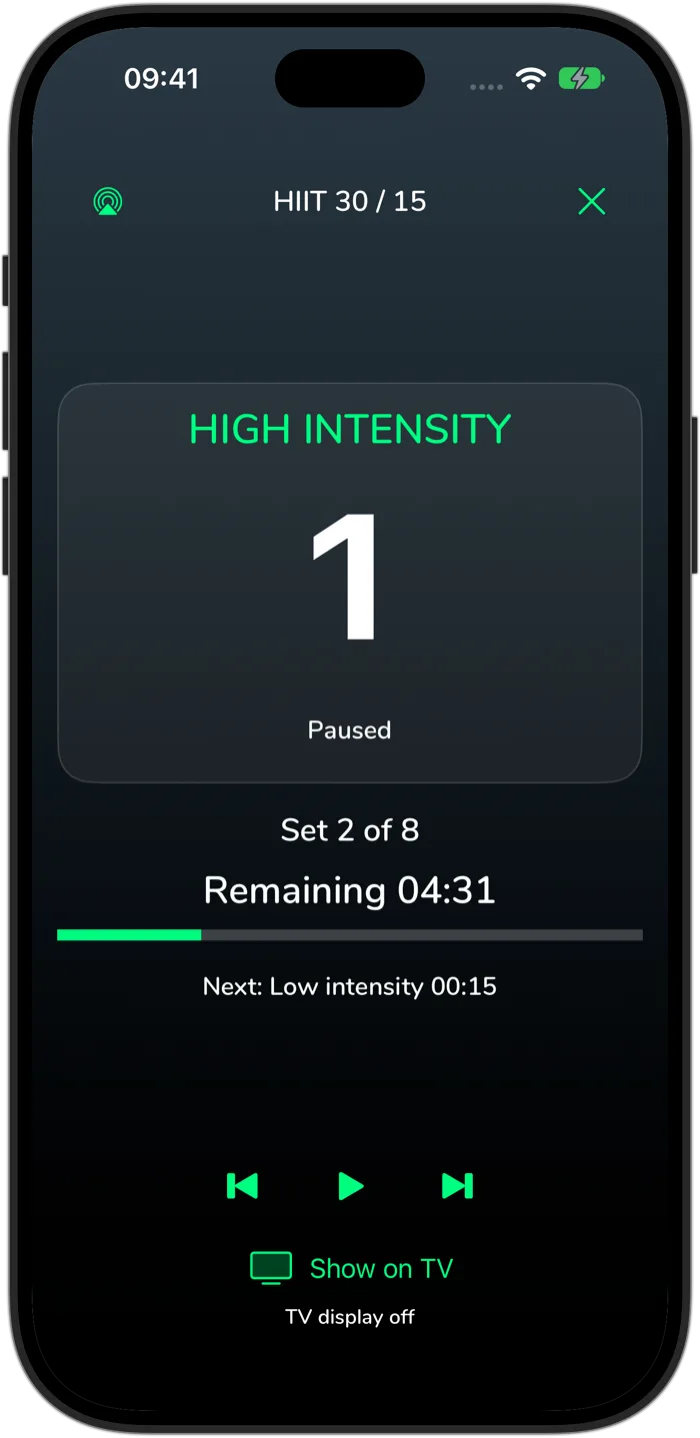
Cero is a timer, not a medical device. If you’re new to hard exercise, are pregnant or have a health condition, check with your doctor first, and stop if you feel unwell.